
Architecture & Performance
Understand why Pixscape separates flexible game state from compact rendering data.
On this page
How Pixscape Works introduces the visual workflow from the developer’s point of view. This page explains why the Runtime separates game state from rendering work, and how each stage prepares for the next.
Why separate gameplay from rendering?
Game and scene state must remain flexible. Entities can gain or lose behavior, gameplay can change authored values, and systems need access to meaningful components.
Rendering has a different job. It processes many similar visual elements, skips what the camera cannot see, establishes drawing order, and sends compatible work to the GPU. The representation that is convenient for gameplay does not need to carry every field through that process.
Separating the two lets Pixscape keep gameplay-facing state expressive while preparing only the data the renderer needs.
Why Pixscape uses ECS and SOA
An Entity Component System (ECS) represents game state as entities composed from small data components, while systems process those components. Pixscape uses Artemis-ODB as its ECS implementation. This gives authored scene state and gameplay code a flexible model without making every entity one large object.
A Structure of Arrays (SOA) stores values of the same kind together in compact arrays instead of grouping every field inside individual objects. Rendering repeatedly processes positions, dimensions, layer information, and other homogeneous values across many visual elements, so this layout can make the required data efficient to iterate.
The gameplay data structure does not also need to be the optimal rendering data structure. Pixscape keeps flexible game and scene state in ECS and prepares separate, compact SOA-style data for rendering. These are two representations serving different needs; the rendering state does not replace the ECS.
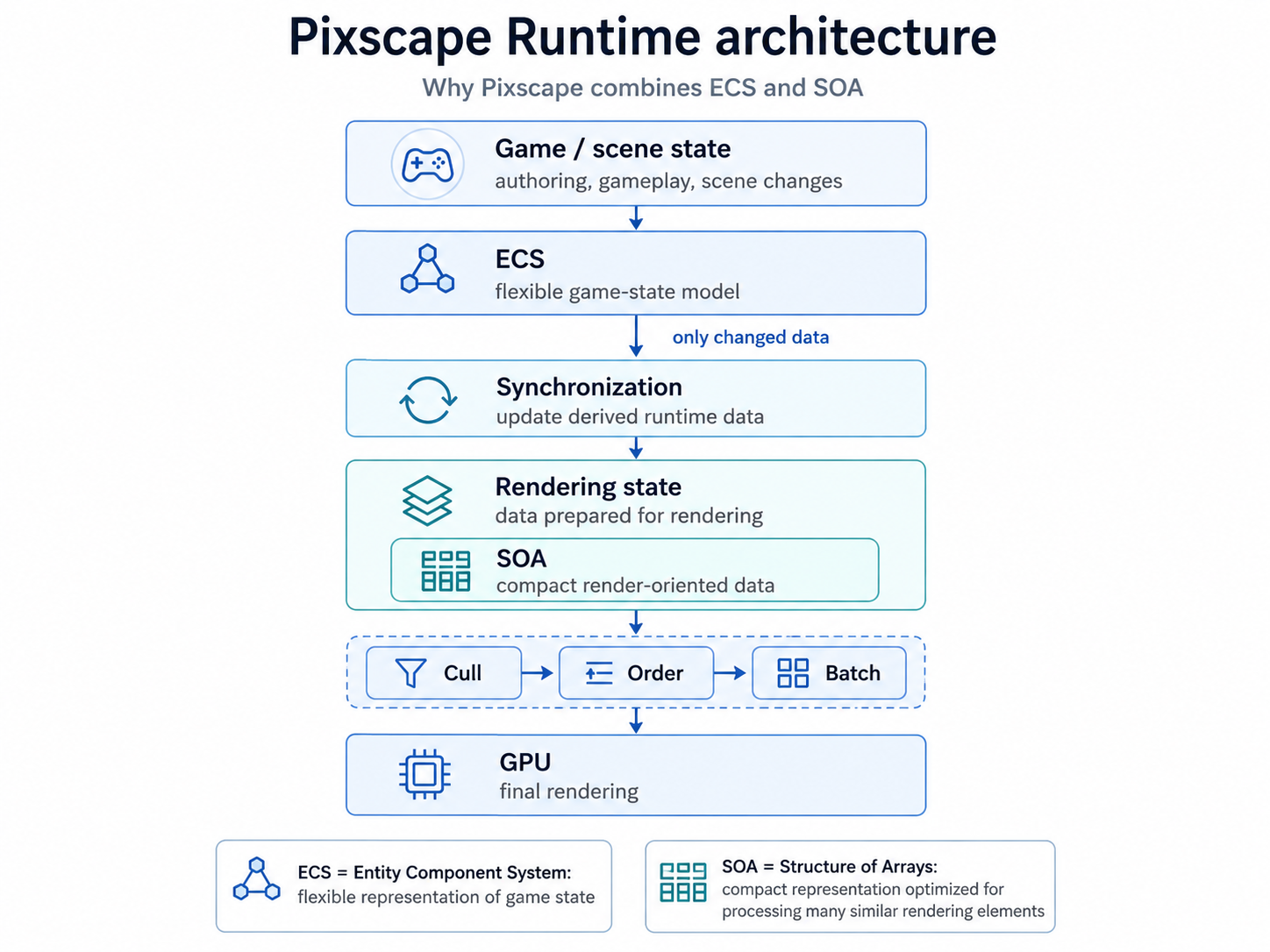
Update only what changed
Because gameplay and rendering use separate representations, changes to the game world must be reflected in the data used by the renderer. This bridge is the Runtime’s synchronization work.
Rebuilding every piece of rendering data every frame would waste work. Pixscape instead refreshes only the data affected by a change. This selective update mechanism is called dirty tracking.
The normal Runtime APIs mark the appropriate changes automatically. Invalidation means marking computed data as no longer valid so Pixscape knows it must be rebuilt or refreshed. Code that modifies ECS components directly must send the corresponding dirty or invalidation notification; Expert ECS Access explains that responsibility.
Skip work that cannot be seen
Culling means excluding visual work that cannot contribute to the current camera view. Pixscape applies camera visibility checks before final rendering work is submitted.
Large Tiled maps can also be considered in visible chunks, avoiding the need to treat every tile as independent frame work when most of the map is off-screen.
Keep drawing order predictable
Visible elements still need a stable visual order. Pixscape combines authored layer order and zIndex with Spatial front/behind relationships on layers where Spatial is enabled.
Pixscape sorts that work before submission so predictable ordering remains the primary rule. Other layers continue to use their normal layer and z-order behavior.
Group compatible rendering work
Once Pixscape knows which visual elements are visible and where they belong in the drawing order, it can group compatible rendering work where possible. Atlases, texture arrays, and batching can reduce avoidable texture or GPU state changes without discarding the required order.
The result still depends on the game’s assets, shaders, materials, blend modes, and scene composition. Grouping enables more efficient submission; it does not guarantee a particular draw-call count or performance improvement in every scene.
Reduce temporary allocations
Pixscape reuses frame data, buffers, and Runtime structures where practical. This can reduce garbage-collection pressure and help keep frame times stable, but it does not mean every frame is allocation-free.
Platform considerations
Core Runtime systems are designed for Desktop, Android, and HTML / WebGL2. GPU behavior and performance differ between targets, so profile the actual game on every platform that matters.
Where to go next
Use Advanced Runtime Integration when custom systems must run at a specific point in the frame or replace final rendering submission. Use Expert ECS Access when the focused Runtime APIs do not provide the low-level ECS access an integration requires.